
Replacing the ATI X1900XT in a Mac Pro 1.1
As far as computers go my current mac has to be one of the longest lasting machines I’ve owned. Purchased nearly three years ago it’s still going strong and although I’ve been tempted to replace it a few times the performance gain by doing so just doesn’t seem worth the expense. I’m a big believer in buying the best specified computer you can afford in order to make it last, and that was the case with this mac pro. The machine is an intel Xeon based quad core 2.66Ghz. When it was purchased I opted to upgrade the standard graphics card to the more expensive ATI Radeon X1900XT which offered much better performance in 3D and video apps.
Other than a couple of RAM upgrades and regular hard drive changes my mac has remained the same over the years I’ve owned it but recently I ran into a problem with the X1900 card. I started noticing horizontal red lines which would strangely appear on windows and would remain attached to those windows as they were moved around the desktop, along with these visual issues my mac started to crash regularly, especially on warmer days. After some trawling on the web I discovered that this is a common problem with these cards. Many people advised cleaning the fan and removing unwanted dust, this does seem to help somewhat but the problems were still happening each day. I started using a fan control app to increase fan speeds in my mac which again helped a little but I need a reliable machine to edit on and the card just had to go.
After three years I expected to be able to add a newer faster card to my mac, but after a conversation with an Apple rep it turned out that the only card I could replace the X1900XT with, was another X1900XT, and to make matters worse they still wanted £264 for the part! X1900XT on the apple UK store

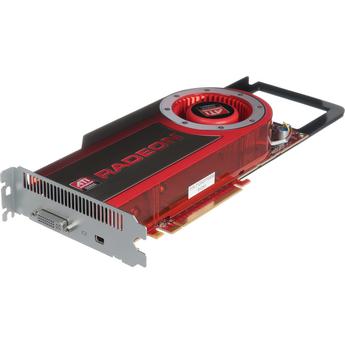
Apple do sell a much more capable card for the newer mac pro’s in the form of the ATI Radeon HD 4870, but it’s listed as only being compatible with machines from early 2008 onwards. Considering that this latest card retails for £280, a mere £17 more than the three year old model it’s also much better value. Radeon HD 4870 on the apple uk store

I called an apple retailer to ask if this newer card could be mde to work in my older mac pro but they just confirmed apples statement and said that my best option was to purchase another X1900XT.
Not wanting to give in quite so easily I spent a bit of time on google and discovered a few reports of the 4870 working in older macs so I decided to take the plunge and risk it. I also ordered one of the new 24″ displays because the 4870 only has one DVI port so I wouldn’t be able to use both of my DVI based monitors. The 4870 replaces the second DI port with one of apples newer MiniDisplay Ports which can be used with the new 24″ screens.
On receiving the new parts I immediately took the old ATI card out of the mac and inserted the 4870, which unlike the X1900 requires two power connectors to be connected to it. The card is supplied with two of the required connectors though and even though my old card only used one, the mac does have two connectors on the motherboard so it was just a case of simply plugging in the second connector.
I switched the mac on half expecting to see some kind of boot error or visual problem but it booted straight up without issue and instantly felt a little snappier in use. The card has been working flawlessly since installing it and the machine hasn’t suffered from any more of the heat related crashes.
I’m not sure why apple list this card as being incompatible with older mac pro’s, maybe there are some that is won’t work with, or maybe they would rather people just purchased a newer machine! In any case it ll works well and is a much wiser choice than the three year old X1900XT for £14 less!


